If you connect several cells in series, you definitely want a BMS. If not for optimisation purposes then for sure for safety and peace of mind. A BMS controls and monitors your whole battery on cell level niveau, disconnects the whole battery in case of over or under voltage and prolongs the life of your precious battery. An active balancer just balances your batteries, shovels energy from a cell with higher voltage to one with lower voltage. Over time, your pack will be perfectly balanced.
Here is a selection of tested Battery Management Systems and Balancer to use for your LiFePo4 battery cells.
I have recently started comparing some of the larger BMS (I call them industrial style or inverter BMS) for certain features and functions and combined all data in this spreadsheet here. It’s an ongoing project and more data will be added to this page constantly.


JK-BMS PB-Series
(Inverter-BMS)
This is the brand new JK-BMS with a lot of new and interesting features. This time, it comes as an inverter BMS, so it can communicate with almost any inverter on the market via CAN or RS485. And, of course, it also has an active balancer onboard, so no need to install one or even worry about cell deviation.
– 8s – 16S for LiFePO4, Li-ion and LTO batteries
– 24V or 48V and 100A-200A
– CAN/RS485 coms to your inverter
– works with Victron Venus OS and many other inverter brands
– RS232 for PC and RS485 for parallel coms
– strong 2A active balancer included
– Bluetooth function
– colour display
– all alarm and protection parameters
– capacity learning function
– 10A current limiter
– Firmware updates
With the latest firmware update for BMS V14 and V15, the BMS can now fully control the charging process through a logic where the user can set the following parameters:
– Absorption voltage
– Absorption timer
– Float voltage
– Float timer
– 0% and 100% voltages
– Alarm buzzer (voltage temperature, current trigger)
– programmable dry contacts (voltage temperature, current trigger, …)
AliExpress product link (JK-Inverter-BMS, V15)
Alibaba product link (JK-Inverter-BMS, V15)
Amazon product link (JK-Inverter-BMS, V15)
JK Inverter BMS Accessories like displays, cables, power button, comms adapter:
AliExpress product link
New PB JK-BMS V19

New BMS version with additional UART port for the new display which shows parallel batteries in all details. The port prepares the BMS for future upgrades and new accessories. Watch the review video here.
AliExpress product link (JK Inverter BMS V19, 100A – 300A)
Alibaba product link (JK Inverter BMS V19)
JK-BMS Resources (Bluetooth app, PC software, Firmware). Newest Firmware here!
Miro’s JK-BMS Code Generators
Please watch the videos below for more information.
The Code Generator has been updated and now also accepts characters within the serial number.

Want a JK Inverter BMS in your Seplos Battery Box?
Get a new JK compatible front plate here.
Watch this video before you buy.


JK-BMS B-Series
(‘Old-style BMS’ but now with the same features as the larger inverter BMS)
This is the BMS we have all waited for. It’s the Jack of all trades, the ultimate BMS AND balancer combined in one device, controlled with one app.
There is now a new version of the JK-BMS B-Series available. It has some amazing new feature as shown here in this video. If you want this new version of the BMS, use the links below and select the Heat/CAN/RS485 version. Also confirm with the seller, that this is the new hardware V17 or V19!
JK-BMS for 4s-24s cells, 40A – 200A constant current, 0.4A to 2A active balancer, heating port, CAN and RS-485 comms, display.
AliExpress product link (40A-200A)
AliExpress product link (300A version!)
Amazon product link
JK B-series accessories (only for the new version of the JK BMS. Watch the video here first)
AliExpress product link (Accessories for the new xxCR JK-BMS only)
AliExpress product link (communication board for the B-series as shown in the video)
AliExpress product link (USB to TTL adapter, cable and connector for firmware updates on the new B-series BMS)
Waterproof power button for any JK-BMS:
AliExpress product link
BMS communication adapter and tutorial.
JK BMS manual including wiring diagram for booster. (PDF, 1MB)
The app can be downloaded directly here from Google Play. Newer version can be found on my Google Drive.
JK-BMS Display-Guide
Jikong 2.3″ Display
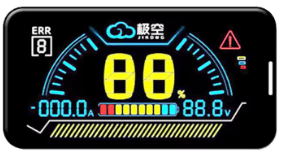
– Compatible with all B-Series and PB (V14-V19) JK-BMS
– Integrated power button
– shows data of BMS it is connected to
AliExpress product link
Jikong 3.2″ Display
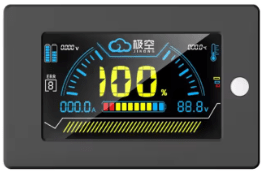
– Compatible with all B-Series and PB (V14-V19) JK-BMS
– Integrated power button
– shows data of BMS it is connected to
AliExpress product link
Jikong 4.3″ Display

– Touch Screen Display showing more info and alarms
– Compatible with all B-Series and PB (V14-V19) JK-BMS
– shows data of BMS it is connected to
– comes with wiring harness, which includes separate power button (please confirm with store before ordering!)
AliExpress product link
Jikong 3.2″ Display (V19)
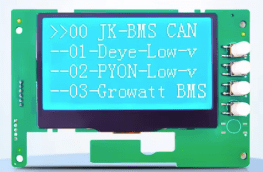
– compatible only with the V19 of the PB-Inverter BMS from JK! (req. FW19.13 or higher)
– connects via UART port
– integrated power button
– can be used to upgrade PACE and Gobel Power BMS screen
– allows for setting inverter protocol via screen
– shows aggregated data of all parallel batteries as well as individual data of each parallel battery.
AliExpress product link
Jikong 4.3″ Display (v19)
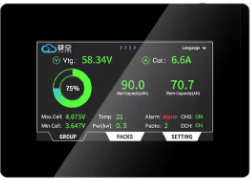
– compatible only with the V19 of the PB-Inverter BMS from JK!
– connects via UART port
– separate power button
– Hi-resolution display with lots of info about all batteries in parallel combined, and also each individual battery in parallel
– only one display necessary which is connected to the master BMS can display all data
AliExpress product link

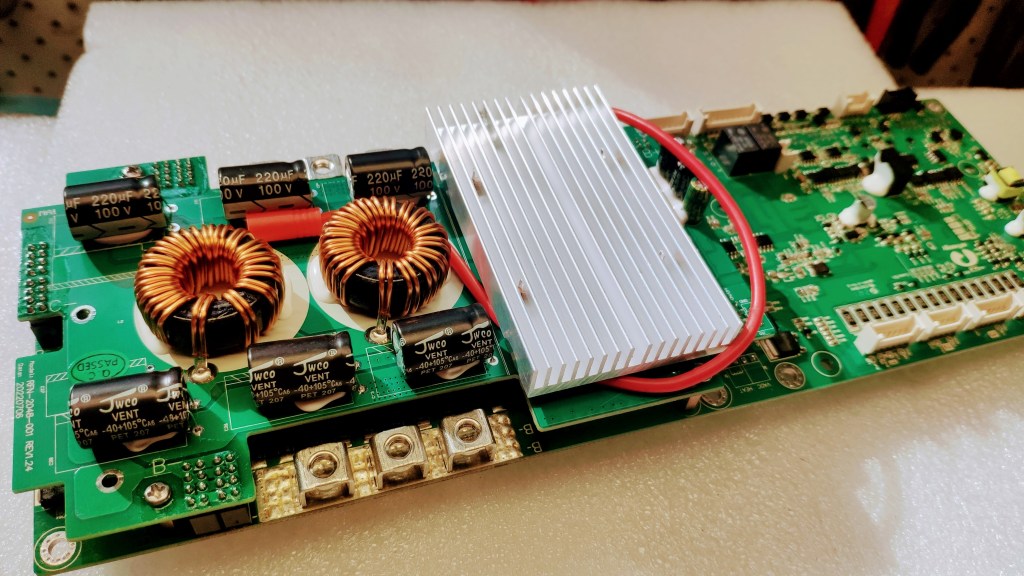
Gobel Power RN150 BMS
Pace 200A BMS Kit
For 16s/51.2V LiFePO4 battery
Max charge and discharge current 150A/200A
Communication ports: CAN, RS485 and RS232
Multifunction Display, power button, dry relay contacts, active current limiter, safety features, battery gauge, all connection cables included.
I have now tested this BMS as part of the Frankenstein Battery build. One of the best BMS I have ever had on my workbench. It can control your inverter, the charging process and fully integrates with the Victron system. The software is comprehensive and can fine tune the system to your battery and charging needs. It almost seems like the perfect BMS?
RN150 Manual, Software and Firmware (just unzip and run the exe file) Google Drive link
I also tested the Pace BMS P16S200A recently and found this to be as perfect as the RN150. Both BMS are very similar and work great with Victron and most inverters. The Pace BMS can also natively be paralleled with Jakiper batteries (which use the Pace BMS as well).
Here is the full test video review.
Pace 200A BMS PC Software (just unzip and run exe file) Google Drive link
AT CHECKOUT, SELECT EITHER:
RN150: Gobelpower RN150 BMS
PC200: Pace BMS P16S200A
$59 Discount with the following link (no order limit) GobelPower product link
$79 Discount when using code GT2K7W9RGRG at checkout (min order $1300)
Or get 4% off if order is over $500 and using discount code PCTOFFADY at checkout!
GobelPower product link
To program the BMS from a computer, you need both parts below:
USB to RS232 adapter (AliExpress product link)
RS232 to RJ11 cable (AliExpress product link)
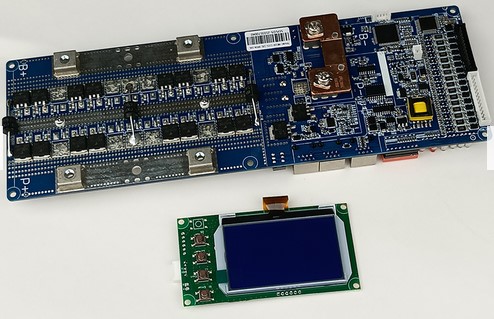

SEPLOS Smart BMS V1 and V2
If you want an industry leading BMS with great communication options to all major inverters, the SEPLOS Smart BMS is the one. It comes with a nice display which gives you all information you need. CAN and RS485 ports are there for communicating to other batteries but also to your Solar system, like the Victron Venus OS.
– 24V or 48V
– 100A, 150A or 200A
AliExpress product link
How to make it work with Victron Venus OS:
I have now re-tested the V2 BMS and it has my full recommendation. With the right settings, it works perfectly with Victron Venus OS.
Watch the video here.
If you want to try my settings and configuration from this video, use the link below for BMS V2 and go to PC-Software – Config Files – Parameter 20230916_0934.xml. Import this file to your BMS (Load Parameters) and click Set All in the Parameter Manager.
Documentation and Software:
Seplos BMS Manuals (Seplos Googe Drive)
Seplos BMS V1 and V2 Resources Manual, Specs, Software, Firmware
(Helmut’s settings and documentation from this video are under the V1 BMS – PC-Software – Config Files)
Seplos Android App 1.0.24 (for iOS, search for EN BMS in the Apple store)
Push-Buttons for BMS: AliExpress product link
2.5mm XH JST-Connector: Aliexpress product link
USB-RS485 Adapter to program the BMS through a computer: AliExpress product link

Bluetooth LCD for Seplos BMS V2 E10
If you have a new Seplos BMS E10 without BT module, here is the upgrade you want!
Simply replace the non-Bluetooth display with this new display and enjoy connecting to the BMS from your mobile phone.
AliExpress product link
Seplos Android App 1.0.24 (for iOS, search for EN BMS in the Apple store)

NEW! SEPLOS BMS V3.0
The newest, latest and greatest in BMS technology. Lots of new features coming with this latest BSM from Seplos (still no active balancer though!). It finally works with the Victron system but has some limitations, you should need to know about.
The paralleling with same BMSes is flawless and easy thanks to its automatic addressing. True plug’n play. But here also, make sure you know your way around and understand how it works and what the limitations are. The inverter protocol can be selected from the screen directly.
The BMS comes in 24V and also 48V versions, 100A -200A and for both NMC and LiFePO4 batteries. RS485 and CAN communication for many inverters.
The Bluetooth function is there but the app is very limited and in password protected.
AliExpress product link
Alibaba product link
Seplos BMS 3.0 Resources Manual, Specs, Software, FW, Bluetooth app, …
(Please ensure the right firmware file for your V3.0 BMS and read the ‘How to choose the correct firmware file’ document!)
Watch the full video review and test here.
Push-Buttons for BMS: AliExpress product link
2.5mm XH JST-Connector: Aliexpress product link
USB-RS485 Adapter to program the BMS through a computer: AliExpress product link



NEW!
Pathfinder BMS From Overkill-Solar
This is a brand new BMS which is developed and produced by Overkill Solar directly. It can handle NMC, LTO and LiFePO4 12-48V batteries from 3s-16s. The BMS has an OLED screen and connects to Bluetooth and Wifi. It is also capable of receiving OTA updates for new features and bug fixes.
The previously sold JBD-BMS are now discontinued!
More Info and Price:
Pathfinder BMS product link
Bluetooth Mobile App works with the Overkill JBD BMS and most other JBD BMS (Overkill-Solar website)
Watch the Overkill Solar App review here, where I explain all settings and functions.
First test setup video, Part 1: https://youtu.be/uFyTQm5hxZM
Deep-dive into the functions and features, Part2: https://youtu.be/70l6aK6RAa4
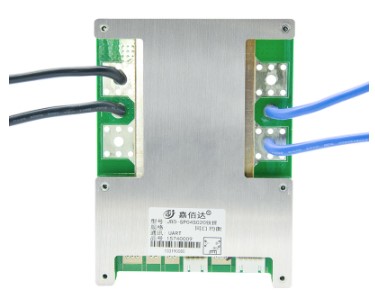
JBD Smart BMS 12V 4S Lifepo4 100A
I tested several JBD “Jabada” BMS recently and found a major problem with the temperature disconnect function. It does not disconnect the load/charger if the current is under the threshold. You can keep charging or discharging the battery in cold/hot weather and potentially damaging your battery. I had a discussion with Will Prowse about this and he talked to several battery cell manufacturers, and it is OK charging cells with small currents even under 0°C.
4S 80-150A: AliExpress product link
4S, 200A with battery heating function: AliExpress product link
7-21S, 200-300A: AliExpress product link
BMS communication adapter and tutorial.
Seems like the ‘Jabada’ BMS are very popular. You need to turn off ‘Charge Balance’ though to make balancing working. With charge balance on (default setting), it will take a very long time to balance your cells, if it works at all…
Watch the full video review here.


QUCC has got a new version of the Relay-BMS. I must say it’s not as pretty as the old version I have but it’s not a beauty contest, so… yeah The Relay is back!
For both Li-ion and LiFePO4 cells from 13s-20s configuration. It still has 200A permanent and 600W peak current.
Bluetooth is included and you can now also program the sleep time when the relay falls off again (as per manufacturer information, mine does not have this function).
QUCC has a very good customer service (they replaced my faulty BMS in no time) and replies to enquires on AliExpress within minutes.
Common port LiFePO4 and Li-ion Smart BMS with Bluetooth function and app support:
200A with relay: AliExpress product link
150A. 4-8S: AliExpress product link
80A-120A 13-15S: AliExpress product link
30A-100A 16-20S: AliExpress product link
Spare relay 500A 12V/24V: AliExpress product link
Separate port BMS with 2 relays and display, Bluetooth and app support, 300A
AliExpress product link for 3s-8s Li-ion and LiFePO4
AliExpress product link for 12s-16s Li-ion and LiFePO4
Link to newest Xiao Xiang App for QUCC and other BMS’s.
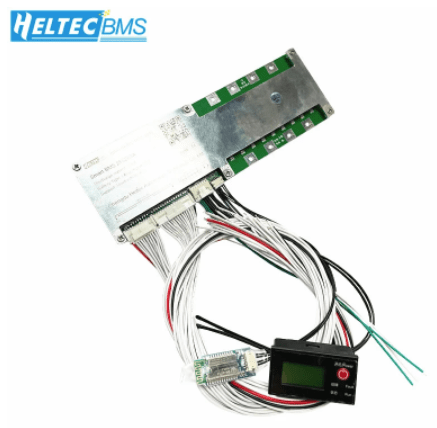
HELTEC Smart BMS 50A – 200A
What can I say? The HELTEC Smart BMS feels a bit outdated with no real outstanding features. It is a basic protection board with a beginner friendly app and connection. View the video review here.
– 3s – 25s, 50A – 200A
– 120mA balance current
– iOS and Android smart app version
It comes with a display, RS-485 or CAN and Bluetooth communication.
AliExpress product link
BMS communication adapter and tutorial.

100Balance BMS, with active balancer and Wifi
I thought this BMS was the JK competitor as it is one of the few BMS out there with an active balancer. It also has CAN and Wifi communication and a rated current of 100A. So ideal to replace a JK BMS? Well, watch the comprehensive review here.
Discharge current: 100A
Charge Current: 50A
CAN and RS485 Inverter Communication,
mobile app, PC Host, Wifi and cloud connectivity
Optional heating module and touch display.
AliExpress product link


Daly Smart BMS
OK’ish BMS with a lot of features (extra features access through a PC only). I’m still a bit disappointed with Daly using such a weird method to balance the cells. This option can not be changed as in the JBD BMS. Charge Balance is outdated, old-school and doe snot work well with high capacity cells. The JK BMS above is far superior with its app, features and balance method.
See the full video review here.
And, we found out how the Daly BMS works and balances.
Watch the video here.
BMS communication adapter and tutorial.
3s – 24s Li-ion and LiFepO4 BMS from 80A up to 500A:
AliExpress product link
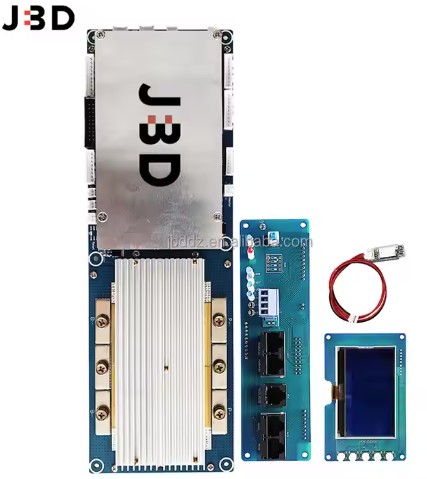
JBD new energy 300A Inverter BMS
To be correct here right from the beginning: This company has nothing to do with the JBD Jiabaida BMS we all know. It is all explained here in this video.
– 50A – 400A models
– 3A active balancer
– 30A current limiter
– inverter communication through RS485 and CAN
– supports up to 32 parallel batteries
– colour touch display
Alibaba product link

Daly Li-ion/LiFePO4 Smart Active Balancer
– 3s to 24S
– 1A active balance current
– smartphone, PC access
– set individual balance on/off voltages as per your needs
AliExpress product link

Active Balancer Equalizer 1A
– 3s to 10s
– for Li-ion, Lifepo4, LTO batteries
– 1A active balance current
– fixed turn on voltage at 3.3V
AliExpress product link
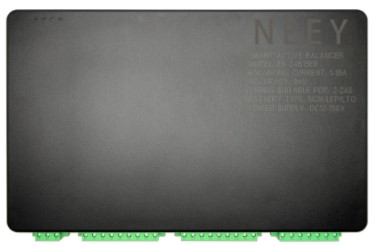
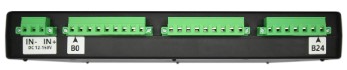

NEEY 15A Smart Active Balancer.
No job is too big for this massive 15A Smart Active Balancer!
It really actively balances with 15A, regardless of the voltage difference in your battery.
It is also smart and adapts the balancing current if it realises the current is too high.
Great product, best quality, works very well and efficient!
– NMC, LiFePO4 and LTO
– 2-24S
– Safety circuits to prevent wrong polarity for power and balance cables.
15A NEEY Active Balancer
AliExpress product link


NEEY – 4A Active Smart Balancer with Bluetooth
The NEEEEEEEEY is back. And it’s good. Better, stronger and fully working. The popular active smart balancer is now working as expected. It is fully fixed as per our feedback. They have listened and all functions are now as they should be. The device is fully programmable and works perfectly. It’s the best and most effective smart balancer on the market so far.
This active balancer can be programmed via Bluetooth app to your needs. Deviation, sleep voltage, balance current… It balances with 4A at any point of time, regardless the voltage difference between the cells. The active balancer can work with all batteries from 2s to 24s batteries configuration.
AliExpress product link
Amazon product link
Cable wiring harness for NEEY Balancer. If you have several battery banks, connect these cables to all batteries and share the NEEY around as needed for the occasional top balance.
AliExpress product link
App download (APK file for Android devices)


Active Equalizer Balancer
I have used these balancers for testing and they are working great. Even with the big capacity cells, they don’t have a problem as they can transfer up to 5A from one cell to another.
I’ve done some testing with these balancers and show this in the video here and here. They really pushed close to 5A across the cells even at lower voltage difference of only 0.7V.
You can order them from 3S up to 21S and they work with all sort of batteries together: Li-ion, LFP and LTO.
AliExpress product link 3s-21s active balancer, 5A balance current
Genuine Enerkey Active Balancer, 5A, 3s-21s
AliExpress product link
HELTEC Active Equalizer Balancer
– 3s-24s, 5A (always-on version)
AliExpress product link
HELTEC Active Balancer
– 3s-21S, 5A
– Balance start voltage: 3.45V
– Balance stop voltage: 3.3V
Video review
AliExpress product link
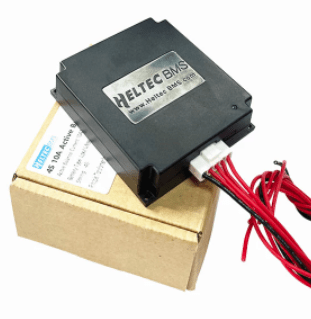
Heltec 10A active Balancer
You can watch the full test here in this video.
– 4s – 8s
– max of 10A balance current
– transformer energy transfer
AliExpress product link

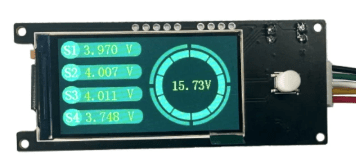
Heltec 5A 10A Active Balancer
– for 4s or 8S batteries
– with RS485 port, supports a display or Bluetooth module including app
– transformer energy transfer
Video Review
AliExpress product link
Heltec Battery Voltage Display:
– works with any 4s battery and shows cell and pack voltage
AliExpress product link

Automate your active balancer with this
Voltage Detection Controller A30-U1
– 6-80VDC
– fully programmable (on, off, voltage calibration, display, relay function)
– dry contact up to 30A
(there is also a U3 version which can delay the relay to operate. We don’t need this function and the U1 version is fine!)
AliExpress product link
Below are ebay affiliate links for which I may be compensated if you make a purchase. This does not make the product more expensive for you!
eBay product link
Amazon product link
Watch the review and how-to video here on YouTube.
All links on this page are affiliate links to support the channel. I’m getting paid a small commission if you order products or services through these links. This does not make the products or services more expensive for you.
 the Off-Grid-Garage